Author: Umar Farooq
Date: August 15, 2026
Category: Photography & Design
Read Time: 6-7 minutes
Expert Review: Photography & Design Specialist
Quick Answer: How Do You Scale Images While Maintaining Aspect Ratio?
An image proportion calculator maintains aspect ratios by using proportions to scale width and height proportionally. When you enlarge or shrink a photo, an aspect ratio calculator keeps the proportions perfect—no distortion. If your original image is 800×600 pixels and you want to resize to 400 pixels wide, an image proportion calculator automatically calculates the height (300 pixels) to maintain the exact aspect ratio. Perfect scaling every time.
IMAGE PROPORTION CALCULATOR
Resize images while preserving the original aspect ratio.
Upload Image
PNG, JPG, JPEG, WEBP
Original Image
Calculation
Visual Comparison
Original
Resized
Export Resized Image
What Is an Image Proportion Calculator?
An image proportion calculator is a specialized tool for photographers, designers, and content creators who need to resize images while preserving aspect ratios. Every image has an aspect ratio—the relationship between width and height. An aspect ratio calculator solves proportion equations to maintain this relationship during resizing.
Traditional resizing tools can distort images. An image proportion calculator prevents this by using mathematical proportions to ensure that width and height scale identically. Whether you’re preparing photos for social media, websites, or print, an aspect ratio calculator guarantees perfect results without stretching or squeezing.
Understanding Aspect Ratios as Proportions
Every image aspect ratio IS a proportion. When a photo is “16:9” (widescreen), you’re describing a proportion—16 parts width to 9 parts height.
The Proportion Structure: Original Width / Original Height = New Width / New Height
Example: Resize 1920×1080 (16:9) to width 960. Find new height:
- 1920 / 1080 = 960 / x
- Using cross multiplication: 1920x = 1080 × 960
- x = 540 pixels
An image proportion calculator automates this calculation. Understanding how to solve proportions reveals why this works for all image scaling.
Common Image Aspect Ratios and Uses
| Aspect Ratio | Dimensions | Primary Use | Example |
|---|---|---|---|
| 16:9 | 1920×1080 | Widescreen video, YouTube | HD videos, cinema |
| 4:3 | 800×600 | Standard display | Older cameras, presentations |
| 1:1 | 1000×1000 | Social media | Instagram posts, avatars |
| 3:2 | 1200×800 | Photography | Professional cameras |
| 9:16 | 1080×1920 | Mobile vertical | Instagram Stories, Reels |
| 2.39:1 | 2390×1000 | Cinematic | Film production |
An aspect ratio calculator works identically for all these formats. The proportion principle remains constant regardless of final dimensions.
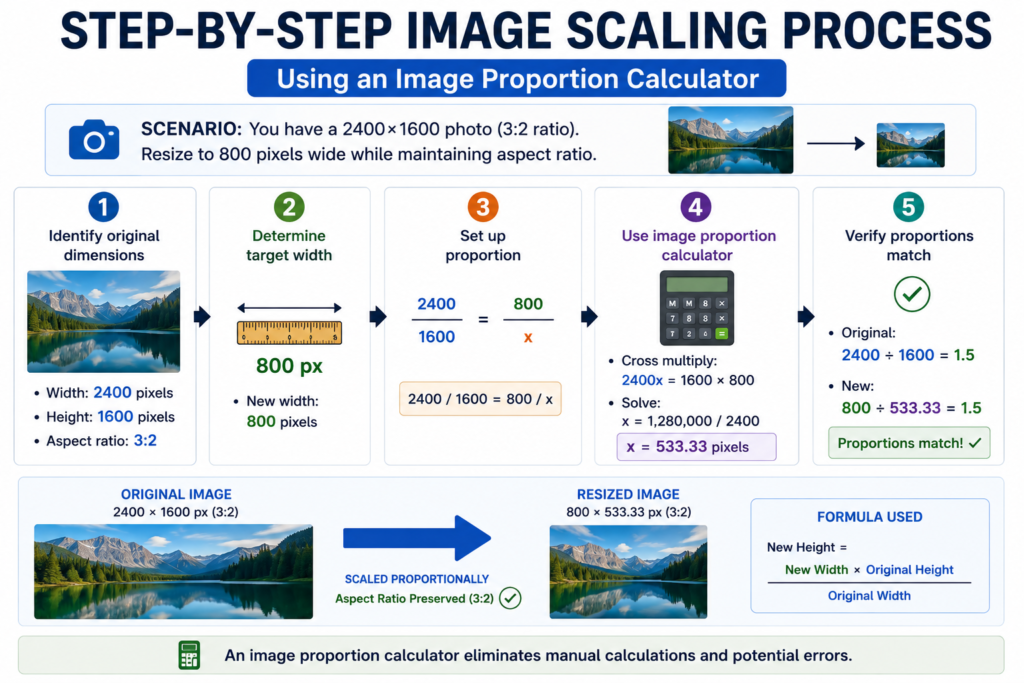
Step-by-Step Image Scaling Process
Using an Image Proportion Calculator
Scenario: You have a 2400×1600 photo (3:2 ratio). Resize to 800 pixels wide while maintaining aspect ratio.
Step 1: Identify original dimensions
- Width: 2400 pixels
- Height: 1600 pixels
- Aspect ratio: 3:2
Step 2: Determine target width
- New width: 800 pixels
Step 3: Set up proportion
- 2400 / 1600 = 800 / x
Step 4: Use image proportion calculator
- Cross multiply: 2400x = 1600 × 800
- Solve: x = 533.33 pixels
Step 5: Verify proportions match
- Original: 2400 ÷ 1600 = 1.5
- New: 800 ÷ 533.33 = 1.5 ✓
An aspect ratio calculator eliminates manual calculations and potential errors.
Real-World Photography Applications
Social Media Image Sizing
Instagram requires specific dimensions for different post types. An image proportion calculator resizes your photos to Instagram’s exact specifications while preserving quality. Instagram Stories (1080×1920), feed posts (1080×1350), reels (1080×1920)—all maintain perfect aspect ratios using proportions.
Website Image Optimization
Web designers use an aspect ratio calculator to prepare images for different screen sizes. A hero image needs perfect proportions for desktop, tablet, and mobile. Proportions ensure responsive images look perfect on every device.
Print Photography
Printing requires specific aspect ratios—5×7, 8×10, 11×14. An image proportion calculator determines cropping or scaling needed to fit print dimensions without distortion. Professional photographers rely on aspect ratio calculations for every print job.
Thumbnail Creation
Creating thumbnails requires precise scaling. An image proportion calculator generates thumbnails from full-size images while maintaining the exact aspect ratio for consistent visual presentation across galleries.
Image Aspect Ratio Reference Table
| Platform | Recommended Size | Aspect Ratio | Use |
|---|---|---|---|
| Instagram Feed | 1080×1350 | 4:5 | Regular posts |
| Instagram Stories | 1080×1920 | 9:16 | Stories |
| Instagram Reels | 1080×1920 | 9:16 | Short videos |
| YouTube Thumbnail | 1280×720 | 16:9 | Video thumbnails |
| Facebook Cover | 820×312 | 16:6 | Page covers |
| LinkedIn Banner | 1200×627 | 1.91:1 | Profile headers |
| Twitter Header | 1500×500 | 3:1 | Account headers |
| Blog Featured | 1200×800 | 3:2 | Article images |
Using an aspect ratio calculator for these dimensions ensures images fit perfectly without cropping losses or distortion.
Common Image Scaling Mistakes
| Mistake | Problem | Solution |
|---|---|---|
| Not maintaining ratio | Distorted stretched/squeezed image | Use image proportion calculator always |
| Manual height calculation | Rounding errors create distortion | Calculator handles decimals perfectly |
| Wrong dimensions | Image doesn’t fit platform requirements | Verify aspect ratio before resizing |
| Compression quality loss | Blurry resized images | Use proper image formats (WEBP, PNG) |
| Forgetting original size | Can’t scale back up later | Store original high-resolution version |
An image proportion calculator prevents the first two mistakes automatically through precise mathematical calculation.
Frequently Asked Questions
Q: Why use proportions for image scaling?
A: Proportions mathematically guarantee that width and height scale identically, preventing distortion. Learn more about proportion principles here.
Q: Can I use an aspect ratio calculator for video?
A: Yes! Video aspect ratios work identically—16:9 for widescreen, 4:3 for standard, 9:16 for vertical. Scaling proportions apply universally.
Q: What if my image needs cropping first?
A: Crop to desired aspect ratio first, then use an image proportion calculator to resize. This preserves composition while achieving target dimensions.
Q: Does aspect ratio matter for digital images?
A: Absolutely. Improper aspect ratios cause distortion on different devices. An aspect ratio calculator ensures perfect display across all screens.
Q: Can I scale images larger without quality loss?
A: Not beyond 150% enlargement without noticeable quality loss. Always work from the largest original possible.
Q: How do I find my image’s current aspect ratio?
A: Divide width by height. Use a proportion calculator to verify: width ÷ height. For 1920×1080: 1920÷1080 = 1.78 (approximately 16:9).
Conclusion
Image scaling is fundamentally a proportion problem. Understanding aspect ratios as mathematical proportions transforms image resizing from guesswork into precision work. Whether you’re a photographer preparing images for print, a web designer optimizing for responsive design, or a content creator formatting for social media, an image proportion calculator ensures perfect results.
Master proportion solving for deeper understanding, or use our free image proportion calculator for instant, accurate scaling. For photography-specific guidance, explore our complete scaling guide.