HST Calculator
Real Harmonized Sales Tax Calculator for Canada
Introduction
Need to rapidly compute taxes on your Canadian purchases or business invoices? With our HST Calculator, the guesswork is a thing of the past. Want to calculate the Harmonised Sales Tax and GST amounts for your province? Shopping online, running a small business or creating invoices? This free program does it all for you instantly. No registration necessary, simply enter your amount, select your province and obtain exact tax computations in seconds.
What HST Calculator is?
HST calculator is a free web tool, that automatically calculates Harmonised Sales Tax for Canadian provinces. The Harmonised Sales Tax is only the federal Goods and Services Tax (GST) plus provincial sales tax, so there’s only one rate to work out.
Who is this calculator for:
Businesses:
Small company operators, internet retailers and shop owners utilise HST calculators to swiftly add the taxes to invoice amounts so they may appropriately price their goods and services for clients in different provinces in Canada.
Self Employed
If you are self employed then you will need a good HST Calculator Canada so that you will be able to add the proper amount of tax to your invoices when you send them to your clients. This prevents billing problems and keeps financial records correct.
Clients
Online and in stores, shoppers use calculators to figure out the final price they pay, adding the tax to the base price.
Bookkeepers and Accountants
Financial professionals utilise a HST calculator to check their calculations, draft reports and meet the tax requirements of the Canada Revenue Agency (CRA).
Why a calculator?
Manual computations are sometimes error-prone, wasting time and money. Our calculator takes the guesswork out of the equation and gives you exact numbers in an instant, every time.
HST Calculator Canada – Calculate GST & HST Instantly
Free HST Calculator Canada. Calculate GST, HST, PST & QST instantly with accurate provincial tax rates.
Price Currency: USD
Operating System: ✓ Web-Based Tax Calculator ✓ Windows Desktop ✓ macOS Desktop ✓ Linux Desktop ✓ Android Mobile ✓ iPhone & iPad (iOS) ✓ Chrome Browser ✓ Firefox Browser ✓ Microsoft Edge ✓ Safari Browser ✓ Opera Browser ✓ All Modern Browsers Ya phir aur concise version: Operating System ✓ Web-Based Application ✓ Windows ✓ macOS ✓ Linux ✓ Android ✓ iOS ✓ Chrome ✓ Firefox ✓ Edge ✓ Safari ✓ Opera
Application Category: FinanceApplication
4.8
Pros
- ✓ Instant tax calculations
- ✓ Accurate provincial rates
- ✓ Reverse tax calculation
Cons
- ✗ Internet connection required
- ✗ Canada taxes only
- ✗ No tax advice
- ✗ Province selection required
- ✗ No offline access
The HST Calculator is:
Our HST calculator’s calculator does two sorts of calculations:
Tax calculations forwards and backwards
| Forward Calculation | Reverse Calculation |
| This is the standard manner. You enter the base price and select your province and the calculator doubles the amount by the current HST rate. For example, if you enter $100 and pick Ontario (13% HST), the output will show the final amount as $113. | When you know the entire price and want to take off HST to find the original cost. But a reverse computation works the other way, taking the tax out of the total. This is important if you are getting pricing that include tax and need to extract the tax for accounting purposes. |
Province Selection
You pay different tax rates depending where in Canada you are. The calculator includes all provinces including Ontario, Nova Scotia, New Brunswick, Newfoundland & Labrador, Prince Edward Island, Alberta, British Columbia, Saskatchewan, Manitoba and Quebec. Each is subject to distinct tax structures (HST, GST, PST or QST).
Actual Calculations
This is not an estimation calculator. Calculations are based on current, official Canadian tax rates, adjusted to suit CRA rules. Results are accurate to the cent.
How to Use a HST Calculator: A Step-by-Step Guide?
It is quite easy to use our HST Calculator Canada. Just follow these few steps:
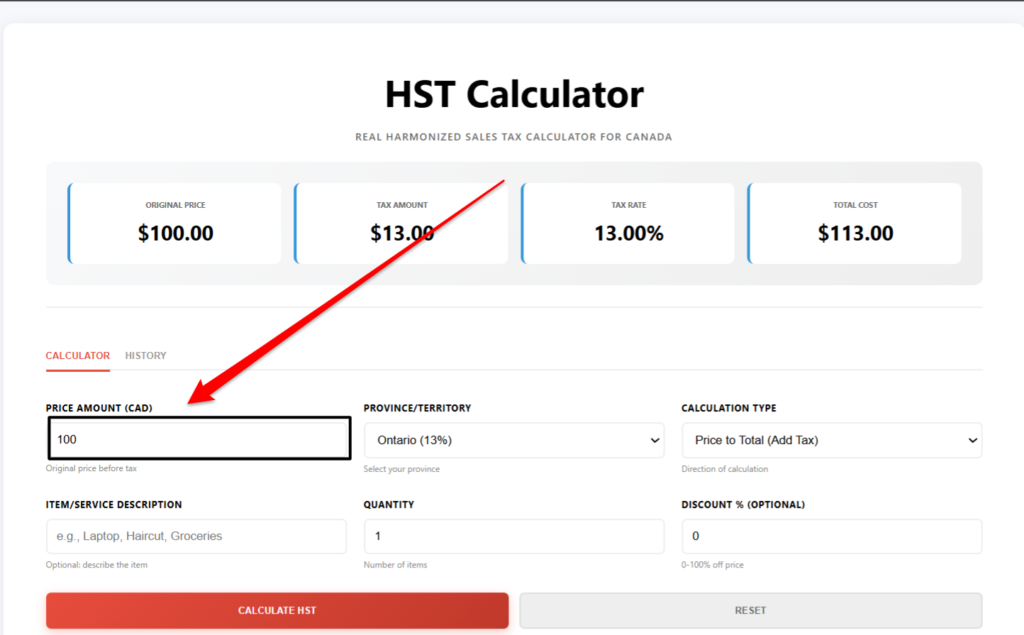
Step 1 – Input Your Amount
First fill in the price or amount you want to calculate. Enter the amount, which is the basic price (before tax). You can type any value starting from 0.01 dollar and above. Whether you are buying anything for $5.99 or making a $10,000 business deal the calculator works just as effectively for all sizes.
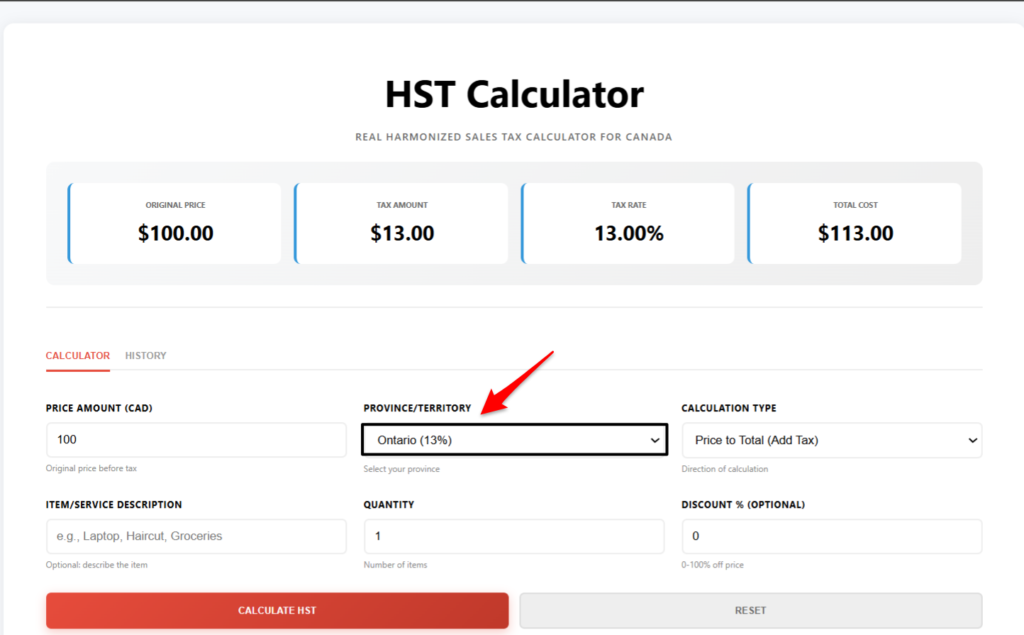
Step 2 – Choose Your Province
Choose your province from the drop down menu. This is essential because tax rates are not uniform across Canada. Each province has its own sales tax system:
Ontario – GST 13%
Nova Scotia – 15% HST
New Brunswick – 15% Harmonised Sales Tax (HST)
Newfoundland & Labrador – HST 15%
Prince Edward Island – 15% GST
Alberta – 5% GST only
British Columbia – 5% GST + 7% PST
Saskatchewan – 5% PST + 6% PST
Manitoba – GST of 5%, HST of 8%.
Quebec – GST of 5% + PST of 9.975%
Otherwise results will be wrong if you choose the wrong province . Make sure you are in the right place before you calculate.
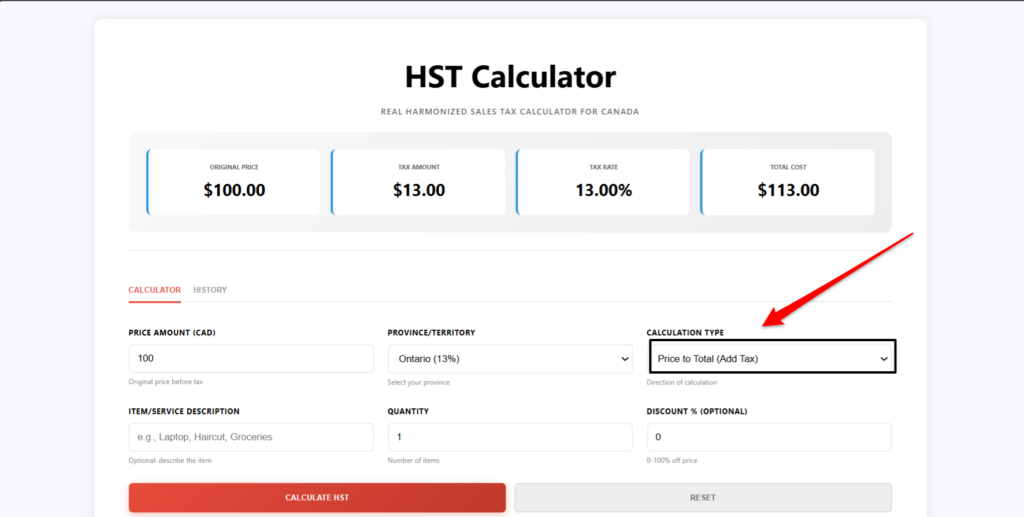
Step 3 – Choose Calculation Type (Pre or Post Tax)
Determine if your sum is pre or post tax:
Before Tax — Choose this option if you have a base price and wish to add tax on top. Most popular for invoice calculating and shopping.
After Tax – This is used when you have the entire cost and simply want to eliminate tax to find the original pricing. Required for HST back-calculation.
This will make a major impact in your results so choose wisely what you require
Step 4 – Click on Calculate
Input the dollar amount and select your province and the type of calculation you wish to do. Then press the Calculate button. The calculator will process your input instantaneously.
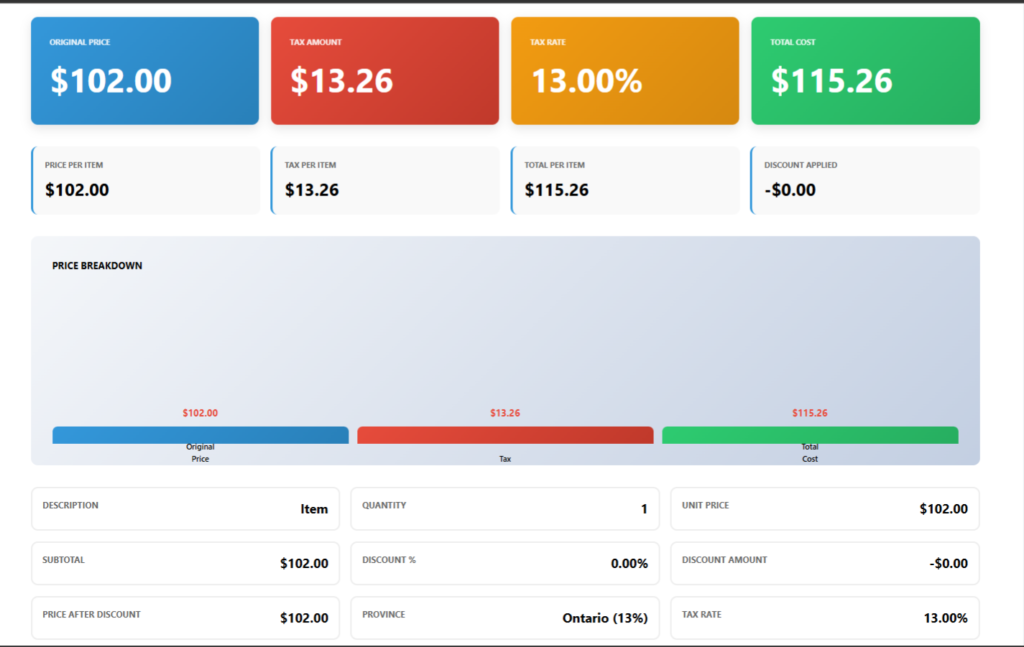
Step 5: Check Your Results
The results instantly indicate the base price, tax amount, final total, and the province’s tax rate. You can also see detailed break downs, copy results, export calculations to CSV and check your calculation history.
What does the HST Calculator tell us?
Our calculator shows the details of your tax calculation:
Base price
The figure before any added taxes. This is your first number.
Amount of HST
Your actual Harmonised Sales Tax based on your province rate. That’s what you’ll pay in taxes.”
Tax Amount (GST)
It separates the federal element of the tax ( 5 % ) out to make it clearer . It lets you see the federal part.
Last Price
Total sum with all taxes included. This is the ultimate amount you will charge in stores or bill your consumers.
Province Tax Rate
This is the exact HST or combination tax rate for the province you picked in percent.
Amount Reversed for Tax
In the event of a reverse charge, it means the tax that is subtracted from the total price for accounting purposes.
Current HST Rates by Province
| Province | Tax Rate |
|---|---|
| Ontario | 13% HST |
| Nova Scotia | 15% HST |
| Newfoundland & Labrador | 15% HST |
| New Brunswick | 15% HST |
| Prince Edward Island | 15% HST |
| Alberta | 5% GST |
| British Columbia | 5% GST + 7% PST |
| Saskatchewan | 5% GST + 6% PST |
| Manitoba | 5% GST + 8% PST |
| Quebec | 5% GST + 9.975% QST |
Rates are effective for 2026. Save this page so you can return to verify current rates when you need to calculate sales tax.
Features of Our HST Calculator
- ✓ Official HST Formula – Calculates with proper Canadian tax formulas
- ✓ Reverse Tax Calculator – remove HST from your total prices in seconds
- ✓ Canadian Province Tax Rates | Accurate tax rates for all provinces in Canada
- ✓ GST Inclusive – Displays the federal GST portion separately
- ✓ Mobile Friendly – Looks great on smartphones, tablets and PCs.
- ✓ Instant Results – Wait no more, compute instantly
- ✓ No account required – Use without accounts or revealing personal data
- ✓ Free Forever – 100% free, no hidden costs or premium editions
- ✓ Real Math Calculations – Accurate to the Cent, no guesses
- ✓Tax Rates Updated — Tax rates are automatically updated when changed by CRA
- ✓ Secure – No data collecting or tracking. Your information is private
- ✓ Works With Any Device – Desktops, laptops, tablets and cell phones
Why this calculator for HST?
For Shopping – Before you buy online compute the exact price with tax No surprises at the checkout.
For Business – Charge the right tax to your customers. Keep records accurate and professional.
Budgeting– Tax is an element of your budget preparation. Know the real price before you purchase.
Accounting – Accountants verify calculations, prepare tax reports, and remove manual math errors.
Save Money – Know how much tax you pay on your purchases. See complete costs before you make any trades.
Freelancers – invoice amounts with tax calculation. Be paid well for your work.
For Retailers – Easily add taxes to prices for point of sale systems and online retailers.
Tax compliance: computations are to be made in accordance with the most current CRA standards and Canadian tax legislation.
Who can use this Tax Calculator?
This calculator is for many organisations.
Tax Duties & Billing – Calculation for Small Business Owners
Freelancers – Include taxes in your pricing and invoicing
How to Calculate Taxes for E-commerce Sellers on Amazon, Shopify, and Other Platforms?
Retail Stores – Tax your Point of Sales system
Contractors – Include taxes on bids and invoices
Accountants – Verify customers’ tax figures for audits
Bookkeepers – Record the correct amount of taxes in accounting systems
Online Shoppers – Check the Final Prices before you Shop
Students — Learn about the Canadian tax system
Canadian Residents – Calculate tax for any Canadian transaction
Real HST calculation examples
Example 1 – Ontario Purchase
Cost: $500 per item.
Province: Ontario 13% GST
HST $65.00
Total: $565
Example 2 – Nova Scotia Accord
Price: $750.00 Item
Province: Nova Scotia (HST 15%)
HST $112.50
TOTAL $862.50
Example 3 – Working backwards
Total Price: $565.00
Province: Ontario (13% HST)
HST not included Original price $500
Tax taken off: $65
Example 4 – Business Declaration
Service value: $2,000
Province: Ontario (HST 13%)
HST: 260$
Customer will pay $2,260
Using a HST Calculator Common Mistakes to Avoid
Inaccurate Tax Amounts
Selecting the wrong province will lead to inaccurate tax amounts. Alberta has 5 % GST , Atlantic provinces 15 % HST . Know where you are always.
Confusing Calculation Direction
“Before Tax” instead of “After Tax” will turn your results upside down. Please choose the option that pertains to you.
Forget reverse tax function
If you have a total and need the original price, do reverse calculation instead than trying to guess. This makes it correct.
Old Tax Rates
Mistakes will be made when old computations are bookmarked with old tax rates. Results are based on current rates; check for updates.
Rounding Errors
Rounding manually reduces accuracy. The calculator will automatically do exact cents.
HST vs. GST/PST
Some provinces have HST, and some have GST plus PST. Provincial types cannot be mixed in calculations.
Incorrect Invoice Amounts
Check your base pricing before you calculate. Small faults get magnified across several items.
Business versus Personal Confusion
Some businesses have different tax duties. If you are not sure of the applicability, please contact CRA.
How to Calculate HST Correctly?
Always Use Current Rates
Always use the current tax rates, thus bookmark our calculator site to utilise the latest tax rates, every time you need to.
Check invoice amounts
Make sure the initial price is correct before conducting any maths. Wrong results because of wrong inputs.
Select the Province Wisely
If you work in more than one province, you’ll pay tax separately for each place.
Reverse Calculator Properly
To get tax out of totals, use the “After Tax” option to get the correct original costs.
Save Invoices & Records
Save your calculations to help with your accounting and tax needs. Many calculators export in CSV format.
Verify GST/PST Provinces
If provinces are using GST plus PST or QST, make sure the calculator takes both into account.
Check the Calculation Type
Make sure you are adding tax or removing tax before you hit calculate.
Look at the specific results, not just the bottom line. Look for surprises in the breakdown.
Calculation of HST Forward/Reverse
Forward computation:
When to use – You have a basic price and wish to add tax
Formula – Base Price x 1 + Tax Percentage
Example – $100 x 1.13 (Ontario) equals $113 total
Back-Calculation:
When to Use – When you know a final pricing and want to take tax off
Formula = Total Price / (1 + Tax Rate)
$113 / 1.13 = $100 basic pricing
You are using the calculator appropriately in any case when you use both techniques.
HST, GST, PST & QST Explained
| HST (Harmonised Sales Tax) | QST (Quebec Sales Tax) | GST (Goods and Services Tax) | PST (Provincial Sales Tax) |
| One rate for federal and provincial levies. Ontario (13%) and Atlantic provinces (15%) Used | Quebec provincial tax (9.975%) plus 5% GST. | 5% federal tax only Applies in Provinces without HST | A Provincial tax added to the GST in provinces such as British Columbia (7%), Saskatchewan (6%) and Manitoba (8%). |
Tax structure varies from province to province. Our calculator will automatically apply the correct combination for your province.
Advantages of an Online HST Calculator
Save Time — Get your calculations back in seconds instead of minutes of laborious maths.
Accuracy — No human error in calculations. All results are given to the penny.
Business Growth – Spend less time calculating, more time on your business.
Professional Invoices – Ensure you charge the correct amount of tax on all your customer invoices.
Shopping Confidence Know pricing before you buy.
Accounting Efficiency – Re-check the numbers, keep accurate accounts.
Tax Compliance – ensure your calculations are in line with the Canadian tax legislation and CRA guidelines.
Questions and Answers
HST Calculator
Frequently Asked Questions – Harmonised Sales Tax Guide for Canada
Disclamer
This HST Calculator does the real math, based on the tax rates and the information you provide. The results are for calculating purposes only and depend upon the correctness of the numbers you provide. The calculator is based on current Canadian rates for HST, GST, PST and QST. Always with the Canada Revenue Agency (CRA) or your tax advisor for official tax requirements. This tool is not linked with the Government of Canada or the CRA. Results are for reference only, not tax advise Please consult your tax pro.
Concluding Thoughts
We have a HST calculator to make it easier for all Canadians to compute their taxes. Try this free tool and get immediate results while shopping, producing business invoices or managing your funds. No need to register. No difficult formulas to memorise. Enter your amount, select your province and get accurate tax calculations in seconds. Save this HST calculator now and ditch the tax calculation hassle. Perfect for business owners, freelancers, accountants and anyone dealing with Canadian sales tax.